
Quick choices by device
Start with the device you will actually use. A touchscreen app can offer different controls and features from its TV version. What matters is a suitable interface, the right input method and the features you will use, rather than the longest possible list of extras.
TELOS is worth considering on iPhone and iPad if you want personal profiles, a watchlist and eligible offline downloads in one player. For television viewing, check the relevant TV version. If you need an Android TV app with a different remote-control interface, compare TiviMate against your own requirements. The choices below give you a starting point without claiming one universal winner for every device.
iPhone or iPad: explore TELOS
Personal choices, up to five local profiles and eligible downloads on iPhone and iPad. Then check the M3U or Xtream input method for your source.
Open the relevant guide →Apple TV or Fire TV: check the TV version
TELOS has TV versions. Check availability and controls on your actual device. The compatible Fire OS version matters on Fire TV.
Open the relevant guide →Android TV: compare TiviMate
Start with remote controls, playlists and EPG. Check recording and convenience features against the current listing and your device.
Open the relevant guide →Android phone: explore Televizo
Multiple playlists, a programme guide and touch controls are useful selection questions. Match the actual features you need before buying.
Open the relevant guide →Samsung, LG or Windows?
Start with the device guide. An Android listing does not establish a native Samsung Tizen, LG webOS or Windows version.
Open the relevant guide →These choices are starting points for different situations. Device support and features can differ between app versions. Use the descriptions and linked listings to check your exact combination.
Players at a glance
Compare the device and input method first, then the cost. A free download can include a trial or in-app purchases. Paying for a player does not give you a television subscription.
| Player | Devices and requirements | Playlist and login | Pricing model |
|---|---|---|---|
| TELOS IPTV PlayerAdvertisement · TELOS |
|
| Free download with a trial period; playback requires payment afterward. Check current purchase terms, the available plan and device eligibility in the relevant store before buying. No channel package is included in the price. |
| TiviMate IPTV Player |
|
| Google Play lists in-app purchases. The official terms describe a one-time lifetime purchase and automatically renewing subscriptions; current available prices and durations are shown at checkout. |
| Televizo - IPTV player |
|
| Google Play lists ads and in-app purchases. The reviewed store view does not state a specific Premium price or scope; check the offer in your own store. |
| iMPlayer TV IPTV Player |
|
| Google Play lists in-app purchases. The official website currently describes a 24-hour trial after registration, Premium at $20 per year or $35 for lifetime, and additional devices at $7 per device. Recheck the offer and device plan before buying. |
| Perfect IPTV Player |
|
| The US App Store listing shows free download with in-app purchases. Paid options are listed, but exact prices and availability vary by storefront; check the user's store. No free trial claim verified. |
| Smarters Player Lite |
|
| The US App Store listing shows a free download and an in-app purchase for the Premium Version (US listing currently shows $1.99). Price and availability can vary by region and change; check the user's store. No trial claim verified. |
| ibo Pro Player |
|
| Free download with in-app purchases. The US App Store page currently shows a $9.99 activation; check the price and offer in your own store before buying. |
| Smarters Pro |
|
| Apple App Store: free download with in-app purchases; the US storefront shows Premium at $4.99. Google Play lists in-app purchases for the mobile and TV apps. Price and terms depend on store and region. |
| XCIPTV PLAYER |
|
| Google Play marks the listing as containing ads. The reviewed store view does not show a current specific price or price scope; check the offer in your own store. |
| IPTV Smart Player |
|
| The US App Store listing shows a free download and optional in-app purchases, including Player PRO subscriptions and a free trial. Prices and terms vary by storefront and may change; verify them in the user's store. Android pricing was not verified. |
A closer look at the apps
TELOS appears first as a product suggestion. Alternatives for different devices and needs follow. Open a profile for the exact app listing, full features or a direct comparison.
TELOS IPTV Player
Advertisement · TELOSTELOS may suit you if you want to use your own playlist in a clear interface and combine personal profiles, a watchlist and eligible downloads on iPhone or iPad. Up to five local profiles let you personalize the selection there. Taste recognition runs locally on supported Apple versions; this does not imply an identical cross-platform recommendation service. TV versions are available for Apple TV and compatible Fire TV devices. Check the feature on your device: downloads on iPhone and iPad do not mean downloads are promised on Fire TV.
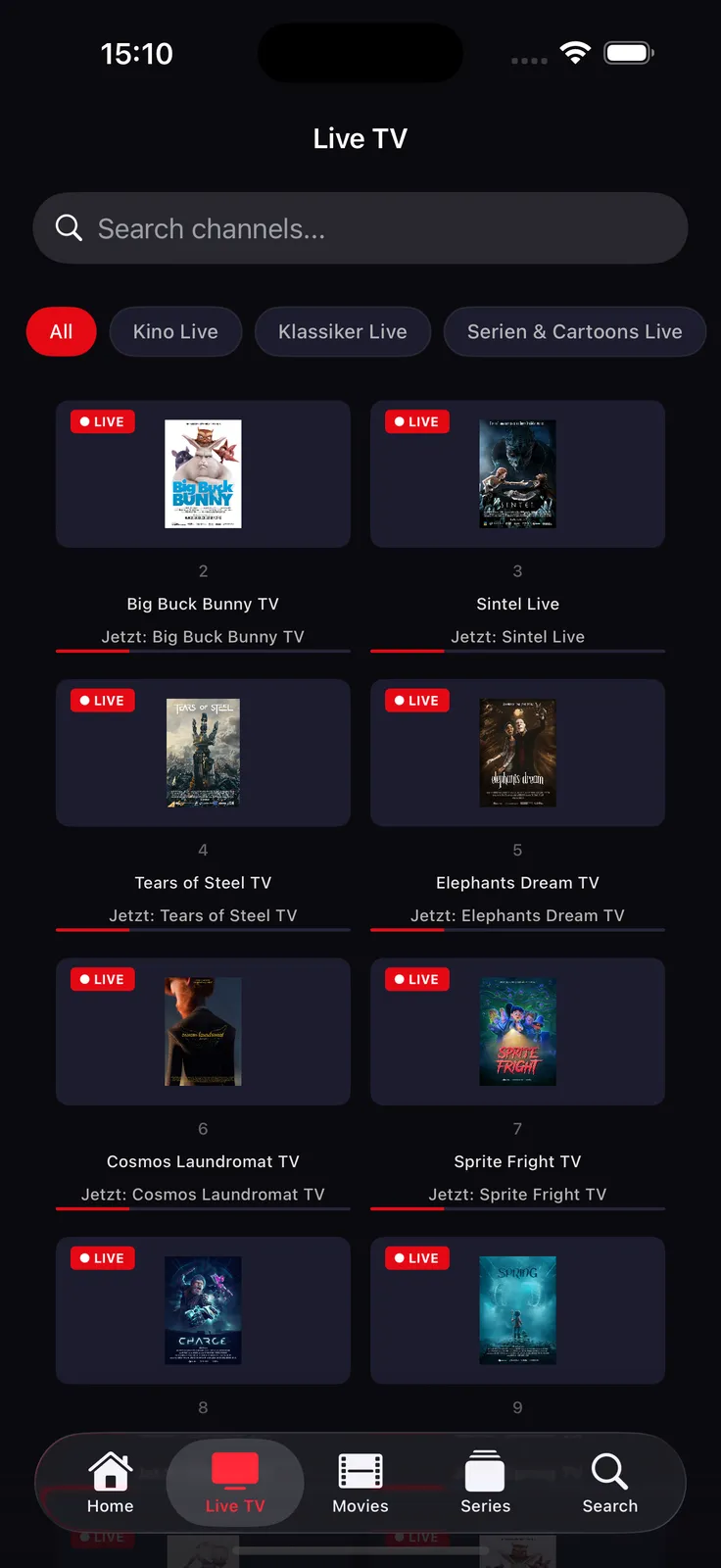
Useful features
- Up to five personal local profiles on iPhone and iPad
- Watchlist and personal selections
- Local taste recognition on supported Apple versions
Pricing model: Free download with a trial period; playback requires payment afterward. Check current purchase terms, the available plan and device eligibility in the relevant store before buying. No channel package is included in the price.
TiviMate IPTV Player
Google Play describes TiviMate as intended for Android TV devices and remote-control use. It may suit you if you want to manage several M3U, Xtream or Stalker sources and use EPG, favorites, catch-up, recording or multiview. This feature list comes from the official product description and is not an independent playback test. The store says the app is not optimized for phones and tablets.
Useful features
- EPG grid
- Favorites and search
- Catch-up and recording
Pricing model: Google Play lists in-app purchases. The official terms describe a one-time lifetime purchase and automatically renewing subscriptions; current available prices and durations are shown at checkout.
Televizo - IPTV player
It may suit Android phone, tablet or TV users who want multiple playlists, EPG, catch-up or Chromecast. The provider describes Televizo as a player that does not include content.
Useful features
- Multiple playlists
- Electronic programme guide (EPG)
- Catch-up
Pricing model: Google Play lists ads and in-app purchases. The reviewed store view does not state a specific Premium price or scope; check the offer in your own store.
iMPlayer TV IPTV Player
The TV app meant here is the HzApps Google Play listing with package com.myiptvonline.implayer. It may suit Android TV users comparing EPG, VOD and, depending on the source, catch-up or recording. The official website lists M3U and JSON playlists. Do not confuse this listing with the separate mobile app.
Useful features
- Live TV and VOD
- EPG
- Catch-up and local timeshift
Pricing model: Google Play lists in-app purchases. The official website currently describes a 24-hour trial after registration, Premium at $20 per year or $35 for lifetime, and additional devices at $7 per device. Recheck the offer and device plan before buying.
Perfect IPTV Player
This player may be especially relevant if your source uses M3U, XSPF or the Xtream Codes API and you want to add XMLTV EPG. Apple’s description also lists a wide range of network protocols and streaming formats. For Apple TV, the store additionally lists VOD, series, catch-up, parental controls and dark mode. The app is listed for iPhone, iPad and Apple TV; Mac compatibility with Apple silicon is listed but not verified by the store. These details describe supported formats, not the quality or availability of your particular streams.
Useful features
- Built-in player
- Numerous network protocols including HTTP, FTP, RTSP and UDP
- Streaming formats including HLS and MPEG-DASH
Pricing model: The US App Store listing shows free download with in-app purchases. Paid options are listed, but exact prices and availability vary by storefront; check the user's store. No free trial claim verified.
Smarters Player Lite
Smarters Player Lite may suit you if you want to play your own M3U or JSON playlist on iPhone, iPad or Apple TV. The store also lists local and remote sources, live streams, video on demand and audio. It explicitly presents itself as a standalone player; according to the listing it does not provide content or channels. The currently reviewed description does not confirm Xtream access or EPG, even if older or other Smarters offers use those terms. Check the exact Lite app and Apple ID, and rely on your own store’s current description for any required feature.
Useful features
- Live streaming
- Video on demand
- Audio playback
Pricing model: The US App Store listing shows a free download and an in-app purchase for the Premium Version (US listing currently shows $1.99). Price and availability can vary by region and change; check the user's store. No trial claim verified.
ibo Pro Player
ibo Pro Player is a candidate for Apple users whose provider supplies an M3U URL or playlist. The store description lists Apple TV, iPhone and iPad, and features for metadata, favorites, subtitles, audio tracks and parental controls. These are publisher feature claims, not our own device or playback test. Apple lists technical requirements for Mac but marks the app as unverified there.
Useful features
- Playback up to 4K according to the provider
- Film and series metadata such as release date, cast, trailers and ratings
- Favorites for channels, films and series
Pricing model: Free download with in-app purchases. The US App Store page currently shows a $9.99 activation; check the price and offer in your own store before buying.
Smarters Pro
It may suit you if you want an Apple app for iPhone, iPad or Apple TV, or want to compare its separate Android versions. Store identity matters because several apps have similar names.
Useful features
- Playback of personal media from local or remote sources
- Live streaming, video on demand and audio playback
- Multiple playlist formats including M3U and JSON
Pricing model: Apple App Store: free download with in-app purchases; the US storefront shows Premium at $4.99. Google Play lists in-app purchases for the mobile and TV apps. Price and terms depend on store and region.
XCIPTV PLAYER
It may suit you if you want to connect your own Xtream or M3U source with EPG, catch-up and VOD on Android or a supported Fire TV device. The rename in Ottrun documentation makes checking the package ID especially important.
Useful features
- Integrated ExoPlayer and VLC playback with adaptive HLS
- EPG support for documented source types
- Catch-up with EPG
Pricing model: Google Play marks the listing as containing ads. The reviewed store view does not show a current specific price or price scope; check the offer in your own store.
IPTV Smart Player
This player may interest you if you want to add an M3U or XSPF playlist on iPhone and use EPG, favorites or parental controls. The store description also lists multi-screen, picture-in-picture, Chromecast and AirPlay. These are provider claims, not results of our own test; availability may depend on device and version. The App Store entry lists iPhone and iOS 16.6 or later. It also lists Mac compatibility with Apple silicon while stating that the app is not verified for macOS. Android features cannot be confirmed from the available store evidence.
Useful features
- Live TV and video on demand
- EPG
- Multi-screen and picture-in-picture
Pricing model: The US App Store listing shows a free download and optional in-app purchases, including Player PRO subscriptions and a free trial. Prices and terms vary by storefront and may change; verify them in the user's store. Android pricing was not verified.
How to set up your player
A short check before installation can save unnecessary app changes. Work through these steps and change one setting at a time.
- Match the device and official listing. Note the model and operating system. Open the correct store and check both the app name and publisher. Similarly named apps are not necessarily the same product. On a television, also check whether search, channel switching and settings are comfortable with your remote.
- Identify your input method. An M3U link, a local playlist and an Xtream login are different input methods. Use the details your own source actually provides. Enter the server address, username and password carefully. Keep private access details out of public comments and screenshots.
- Check one playback session. Start one permitted item from your source. Check picture, sound and channel changes on the actual playback device. Establish that the basic connection works before configuring favourites, profiles or a large library.
- Set up the programme guide separately. A working channel does not confirm that EPG mapping is correct. The data source, channel identifier and time settings need to match. Distinguish a completely empty guide from shifted programme times, since they call for different checks.
- Check convenience features and purchase terms. Build your watchlist and try the functions that matter to you. In TELOS this could include local profiles and eligible downloads on iPhone and iPad. Before paying, check the term, device coverage and required features in the current store listing.
If something still fails, continue with the relevant guide. Another player is a useful comparison only when the device, source and test item remain the same. Changing an app alone will not repair an invalid playlist or missing programme data.
When setup or playback fails
The playlist will not load
Check the format and import method. For a public test, use only a sanitised sample without private login details.
Open the relevant guide →Video keeps buffering
Compare one item under the same conditions and check the connection on the playback device. Avoid changing network, app and source together.
Open the relevant guide →The EPG is empty
Separate missing data, incorrect channel mapping and shifted times. The EPG guide explains the relevant checks.
Open the relevant guide →Questions about choosing a player
Which IPTV player is best for me?
Choose by device and input method first. TELOS offers useful options on iPhone and iPad such as personal profiles, a watchlist and eligible downloads. On television, the right TV version and remote controls matter. Then compare features and purchase terms.
Does TELOS or another player include channels?
A player is playback software. You supply your own playlist or login. An app’s pricing model therefore does not tell you which content your source provides.
Can I use the same app on my phone and television?
Some publishers offer versions for several devices. Availability and features still need to be checked for each one. An iPhone download feature, for example, does not promise the same function on Fire TV.
Do I need to buy a paid app immediately?
Check the available trial and terms for your device first. A free download can lead to paid playback or additional in-app purchases. Playback in TELOS requires payment after the trial.
Does fast internet guarantee smooth IPTV?
A speed test is only one part of the check. Your home network, the route to the source, the source itself and your device can all affect playback. Troubleshoot with comparable conditions rather than a single speed figure.
Product information and updates
Descriptions refer to the linked product pages and official app listings. Features, prices and availability can differ by device, country and version. This overview does not promise measured superiority. Check the listing for your device before installing or buying.
Source date of the product profiles used here:
- TELOS IPTV Player: Official listing 1 · Official listing 2 · Official listing 3 · Official listing 4 · Official listing 5
- TiviMate IPTV Player: Official listing 1 · Official listing 2 · Official listing 3
- Televizo - IPTV player: Official listing 1 · Official listing 2
- iMPlayer TV IPTV Player: Official listing 1 · Official listing 2 · Official listing 3
- Perfect IPTV Player: Official listing 1 · Official listing 2
- Smarters Player Lite: Official listing 1 · Official listing 2
- ibo Pro Player: Official listing 1
- Smarters Pro: Official listing 1 · Official listing 2 · Official listing 3 · Official listing 4
- XCIPTV PLAYER: Official listing 1 · Official listing 2
- IPTV Smart Player: Official listing 1 · Official listing 2